Tuesday, July 27, 2010

My PLN Update

Here's some of the cool stuff I've learned from all of the Twitter accounts and blogs on Google Reader that I've been following:

USNewsEducation on Twitter: So often we have a misconception about the US being so great in education, but a recent study shows in counting the numbers of US citizens between age 25 and 34 that have "post-secondary attainment," the US comes in 12th in the world. So we're no longer #1...something interesting to know and consider!

UrbanEducation on Twitter: A cool idea that I'm surprised I've never thought of, since it's so simple - students win prizes for the # of books they read, based off of a project in Atlanta schools. Research shows that the best readers are exposed to at least a million words per year, so this tactic goes for pure exposure for students that are poor readers in an effort to up their reading levels.

NationalAutism on Twitter: I learned an interesting fact - deaths for people with Autism are 2x the general population percentage. This is largely attributed to people with Autism wandering off, which leads to tragic drownings and prolonged exposure to elements. I now plan on creating/finding an emergency wandering plan!

theautismnews on Twitter: I read some valuable stories about animal therapy and sports therapy for kids with Autism through goats, sheep, and surfing!

asdhelp on Twitter: The newest tweets here focused on employment discrimination for people with Autism with links to some great sites that have resources for fighting this discrimination, such as Auties.org, Aspies For Freedom, and Autistic Rights Movement UK.

Free Technology for Teachers RSS Feed on Google Reader: I learned on here about Flisti, which is a free no hassle polling tool that lets you embed the poll into your website, blog, whatever, without even registering. I think I'm going to try using it in my classroom website!

Teaching Learners with Multiple Special Needs RSS Feed on Google Reader: This blog had a very useful entry about making a visual schedule that is also a bookmark and timer. Something that would be VERY helpful for students and fairly cheap to make on your own if you have limited funding!

Thrive on Autism Spectrum RSS Feed on Google Reader: This blog offers TV and book reviews that I really want to read/check out after reading the teasers. Two of the books that sounded good to me were "Nobody Nowhere" by Donna Williams and "All Dogs have ADHD" by Kathy Hoopman, as well as the TV show "Parenthood" on NBC, which reportedly has a quite realistic subplot about a family member with Autism. The blog author commented on how sensitively (but practically and realistically as well) the show explains and deals with Autism, in a way that hopefully will spread understanding and awareness for all those that watch the show.

Developments in Special Education Law RSS Feed on Google Reader: While I don't understand all of the law jargon, I like this site because it has big developments and precedents and a mix of larger and smaller cases to refer to, such as cases parents have filed for deficient IEP's (I've never thought about that possibility before) and reimbursement for private school education.

PBS Learning.now RSS Feed on Google Reader: PBS covers such a wide variety of topics, but two stories that I found interesting were one on legal action against cyberbullying and another discussing the role that public libraries can take in breaking down the digital divide.


Monday, July 26, 2010

Who I'm Following & Why


Anyone who knows me knows how I really hate Twitter, and how up until this point I have refused to join and have my own account. Really, all of my stalking/updating/following needs have been met by Facebook and now through Google Reader RSS Feeds, which I like because they are both through accounts I already have, so I don't really have to go out of my way to check up on what's new. BUT, with that said, I may...SOMEDAY, in the FAR AWAY future, come around. By fulfilling the requirements of this assignment on "following" and "Subscribing," I can easily see why this kind of stuff is attractive to people and how you could become addicted. Also, when it comes to continuing education and professional development, I think that having so much information at our fingertips is definitely a good thing, if you put the time and energy into finding the right blogs to follow and the right information that applies to the students you work with, your content area, etc.

That being said, here's who I'M following:

Twitter:
USNewsEducation
UrbanEducation
asdhelp
theautismnews
NationalAutism

RSS Feed/Google Reader:
PBS Teachers Learning.now
Free Technology for Teachers
Teaching Learners with Multiple Special Needs
Developments in Special Education Law
Thrive on the Autism Spectrum

Why? By looking at what I've chosen to follow, you can see that I'm trying to cover all of my bases in both my "need to know" in general education news and also professional development in my specific area of teaching (Special Education) with the specific types of students in my class.

If you look up any of the accounts above, you'll find that they are all current and up to date and aren't accounts that have been abandoned long ago, so I knew that I would be recieving the most current information out there. They also come from a variety of professional, well reputed sources (like PBS) and smaller personal blogs that may have creative takes or original ideas for lessons, etc. I focused on what I saw as my responsiblity to keep up on as a teacher, as well as practically, what I think would have the best resources to suit my needs and solve my everyday problems in being the best, most knowledgable, most effecient, helpful and caring teacher I can be.

Am I completely won over? Not yet. But I might get there.

http://www.twitter.com

Sunday, July 18, 2010

Article Five: Involving Family

"What Should We Expect of Assistive Technology? Being Sensitive to Family Goals" by Phil Parette & Gale A. McMahan, published in Teaching Exceptional Children.

I found that this article provided a much needed perspective considering the family's point of view in evaluating the appropriateness of assistive technology for their student. Too often, schools exclude families from the picture when they are determining what's "best" for the child, even when family and community values are very different from what the professional educators value. I liked that this article gave specific questions that the IEP team should ask when evaluating whether a certain assistive technology would suit a student's academic, personal, familial, and community needs. I'm going to take the time to list them so that you don't have to read the whole article:

"Will you use AT in community settings outside the home? What skills or commitment will be required of others in the community for your child to be able to successfully use the AT device? Are there reasons to not use the AT device outside the home? Will AT make you or your child self conscious or cause undue attention if used in public settings? How will people around you and your child feel if AT is used outside the home? What do you think the AT device will do for your child? How will you and your child use the device? What benefits can you expect? Do you expect benefits to be immediate? What training will be needed? How will you pay for the device? How often will your child use the device? Will your child need assistance? Who will provide assistance? Will you be able to attend training to learn how to use the device? How will attendance at trainings affect your family's routines? How do you think it will affect your child with a disability? How do you think it will affect your home environment? How do you think it will affect your other children? your spouse? other family members?"

I think these are all really important questions to consider because if a school is going to write AT into a child's IEP, then it should be something that is not going to clash with family values and beliefs, and something that a child will actually use outside of school in order to get the maximum benefits. Some parents don't want a device that will call attention to their children and stigmatize as "different." Other parents don't have the time to attend training workshops. Others don't ever expect their child to move out, and so don't really want AT that is geared towards independent living. Some AT disrupts family routines (like transportation in a small car while trying to fit a folded up wheelchair in the trunk), or doesn't meet family expectations (immediate visible progress), and so the family abandons use of the AT altogether, therefore rendering it pointless for the child to have. Overall, I think this article is great because it encourages family involvement, which is already good teaching practice, and then gives lots of practical ways to start these conversations with the students' families.

Link to Article

Article Four: Emotion Recognition Technology

"Using Assistive Technology to Teach Emotion Recognition to Students with Asperger Syndrome: A Pilot Study" published in the May/June 2007 issue of Remedial and Special Education.

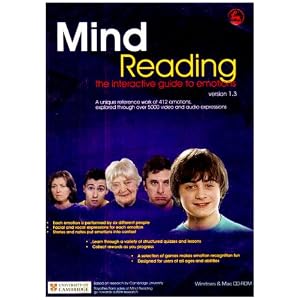
This article examined the effects of a software program called "Mind Reading: The Interactive Guide to Emotions" which can help students with Autism Spectrum Disorder to learn and practice recognizing emotions. This program has over 400 emotions in its catalog and students can view photographs, audio clips, and short movie clips of each one. There are lessons, quizzes, and games, with "rewards" that students can earn over six difficulty levels. Parents, teachers, and students all reported that the program was easy to use, and very effective in raising student emotion recognition skills.

On the website (link below) there is a demo for the program, which I was really impressed with. One hiccup is that the program was first developed in the UK, so you'll notice the voices have British accents. The company did open a US branch in 2004, so I'm not sure if there is a different edition available yet or not. Jessica Kingsley Publishers also has a lot of other software/games/books and other resources that you can buy geared towards students with special needs. I plan on doing some more research on what this company has to offer and then I'll report back!

Jessica Kingsley Publishers - Mind Reading Page

Thursday, July 15, 2010

Article Three: More AT Options


"Spotlight on Assistive Technology," published in the January/February 2005 issue of Media & Methods.

I found this article very helpful in detailing some additional AT that I haven't yet read about in detail. For example, I've seen AlphaSmarts (a brand of Portable Word Processors) around school during substitute teaching, but I guess I've never really sat and thought about how (especially in today's technology saturated world) some students can type more easily than they can write with a pen and paper. Crazy!

Another, much more low-tech AT option is graphic organizers, which I fully support! It's amazing how many teachers DON'T use something so simple that can make such a huge difference for kids who have trouble organizing their thoughts or writing organized notes.

However, for me the coolest AT that this article discussed was Interactive Whiteboards, more commonly known by the brand name SMARTBoard. Especially after designing my very first SMARTBoard lesson, I can envision all the cool ways to use this AT in my future classroom, especially with interactive activities that engage visual, auditory, AND kinesthetic learners. Unfortunately, the tactile experience is one that has been left out of classrooms for so long, even though in my experience, it is one of the absolute best ways for students to be engaged with, and really learn and remember content.

Lastly, I was really impressed with some of the Reading Skill programs described, which help students develop phonemic awareness through different types of activities with sight word recognition, listening comprehension, etc., with increasing levels of difficulty. As I taught Clinical Reading for one of my student teaching placements, I definitely could see using these types of programs in real life, especially when you're teaching teenagers how to read and all the basic books out there seem to be designed for little kids. My students loved to do anything on the computer and saw it as fun time even if they were doing an assignment, so I could see them getting really excited about a "game" for Reading Class.

As cheesy as this sounds, I'm getting really excited learning about all these AT options, because going in as a first year teacher, I'll have all this knowledge in my back pocket!

SMARTBoard Website

Monday, July 12, 2010

Article Two: AT for Writing

"Techtalk: Assistive Technology for Writing" by David C. Caverly, published in Journal of Developmental Education.


This article is a later publication of the same column, with a more specific focus on AT available for writing tasks. Again, I learned about so many options that I never even knew existed, such as raised/wax lines on paper, alternative keyboards, touch screens, "sip and puff" (inhalation and exhalation) systems, wands for students' heads or chins, word prediction software, outline/mapping programs, reference/citation programs, and joysticks/trackballs for students' hands or feet.

Thinking ahead to my paper, I realize that I may have difficulty, because there is SO MUCH AT out there, I fear a 10 page laundry list of every technology mentioned or described in my articles. Reflecting on this, I realized that although I work with students from a low socio-economic status who may never see all the high-tech AT I am learning about, AT is not 100% about access. Training and best fit for students' needs are just as important, and I shouldn't have disregarded that. For example, I have worked with several nonverbal students who have high-tech communication programs, but their machine sits in its case every day because the student doesn't fully understand how to use it, or the machine never gets used at home because parents never recieved training. Some students who had no choice in what type of AT they recieve don't use their assigned AT because it really isn't the best fit for them, and the students weren't involved in deciding what would best fit their individual needs.

Ultimately, I hope to be a special education teacher for students with severe and multiple disabilities, and my goal with this research project is to better educate myself with what's out there, so that I can not only advocate for my students in their ACCESS to AT, but also to ensure that it best fits their needs.

Woodlake Technologies
http://www.woodlaketechnologies.com/default.asp

Article One: Exploring AT


"Techtalk: Assistive Technology" by David C. Caverly & Debra Fitzgibbons, published in the Journal of Developmental Education in 2007.

This article is an introduction to assistive technology (AT)and gives a few examples of the wide range that AT includes. While I had always thought that AT was high-tech stuff like voice recognition software and other space-age technology that I have always found foreign, this article taught me that AT can be as simple as changing the size of a pencil or the way the student holds the pencil.

Caveryly and Fitzgibbons set AT at three different levels: no-tech, low-tech, and high-tech. Other examples of AT include changing the screen background or highlighting key words, screen enlargement software, screen reader programs like Kurzweil, and hyperlinks. While AT always seemed like a vast, intimidating frontier to me, this article really put me at ease as far as my personal knowledge about AT. Yes, there is still a TON that I don't know; however, the research out there is quite extensive, and with a myriad of tutorials and articles, I am really looking forward to the research I have ahead of me, so I can find out about all the other cool AT there is out there!

I suppose I shouldn't be surprised at the seemingly endless possibilities for students with AT with the level of technology that pervades our everyday society. When there's an "app" for everything, and I can Skype with a friend 22 hours across the globe, shouldn't EVERY student have the access to the AT that they need to scaffold and support their learning? Yet, as I read this article, my mind kept turning to the students that I substitute teach for in the Rochester City School District, who desperately need these types of assistance, but will probably never recieve it because of the inequity that exists in our society. AT is definitely great, but what about the students that will never see all of the great technology designed to fulfill their needs?

Kurzweil Educational Systems Website
http://www.kurzweiledu.com/